Callback Notifications
Get told when a caller asks to be called back, instead of finding out later.
Every request also goes into Call Backs, the list in your portal where you call the person back, add notes and mark it done. This page covers how requests are taken and how to be alerted when one arrives.
What happens on the call
When your assistant can't finish what a caller needs, it offers to take a callback rather than sending them away to email you or ring back later.
It already has the caller's number from the call, so it reads it back to confirm rather than making them recite it, and it asks briefly what the callback is about — so whoever returns the call knows before they dial.
It will not promise when someone will call, who will call, or what the answer will be. It says a version of "I'll pass this on and someone will get back to you" and holds that line even if the caller presses for a time. It has no way of knowing your team's availability, and a promise it can't keep costs you more than the callback was worth.
A callback is the fallback, not the first answer. If a transfer target fits what the caller needs, the assistant puts them through to a person instead — talking to someone now beats waiting for a call back. It only takes a callback when no transfer fits, or when the transfer doesn't connect.
For this to work well, give each transfer target a When to use description. Without one, a target matches every caller and the assistant will transfer people it should have taken a callback for.
Turning callbacks off. Each assistant has its own switch — AI Assistants → your assistant → Agent tab → Take Callback Requests — which is on by default. With it off, the assistant won't offer a callback, but a caller who asks for one outright is still recorded.
Turning it on
Alerts are off until you set a recipient, and there are two places to do that. Requests reach Call Backs either way.
Account default
Settings → Notifications → Callback Requests, or the Alerts button on the Call Backs page
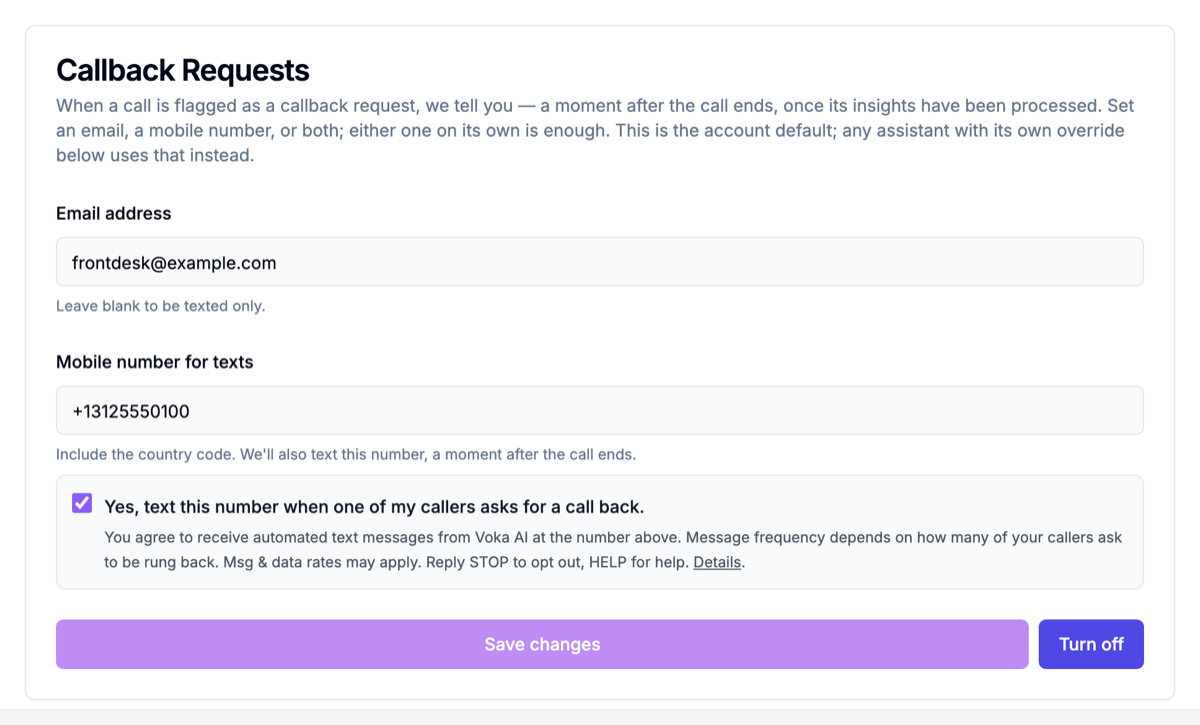
Enter an email address, a mobile number for texts, or both — either one is enough. This covers every assistant that doesn't have its own setting.
To turn alerts off account-wide, use Turn off on that card. Any assistant with its own setting keeps notifying — the page tells you how many.
Per assistant
AI Assistants → your assistant → Agent tab → Callback Requests (shown while Take Callback Requests is on)
Useful when different people should hear about different lines — a front desk for one number, an owner for another. Three choices:
| Setting | What it does |
|---|---|
| Use the account default | This assistant follows Settings → Notifications |
| Send to someone specific | This assistant alerts its own recipients instead |
| Do not notify for this assistant | This assistant stays quiet, even if an account default exists |
An assistant's own setting always wins over the account default. Only one alert goes out per call — nobody gets two copies.
What you receive
Email
Sent when an email address is set. The subject leads with the action so it's useful from a lock screen:
Call back Dana Smith — (555) 123-4567
Inside: the number as a tap-to-dial link, what the caller wanted, an Open the call button that opens the request in Call Backs, and the time of the call in your own time zone.
Text message
Only if your account has the SMS add-on. Add a mobile number, with or without an email, and you'll get a short text like this:
Voka: Dana Smith asked for a callback. Call back: (555) 123-4567. https://voice.vokaai.com/callbacks?call=…
The link opens the request in Call Backs. Texts come from a Voka number, not your own toll-free number, and they don't count against your SMS allowance.
Seeing them in the portal
Every callback request appears in three places, whether or not you set up alerts:
- Call Backs under Analytics — the list you work from. Call the person, add notes, and mark it done.
- The notifications bell → Priority tab. Callback requests from the last 7 days, each with the number to dial. Click one to open it in Call Backs.
- A Callback badge on the call in your call log, so you can filter for them. Exports label the column Callback Requested.
Press I'm handling this on a request in Call Backs before you dial, so two people don't call the same customer back within a minute of each other. See Working a callback.
Worth knowing
Alerts arrive after the call ends, usually within a minute — not while the caller is still on the line. They're generated from the analysis of the finished call.
Ordinary calls produce nothing. Someone asking your opening hours won't generate an alert. Only a caller who actually asks to be called back does.
Check your spam folder the first time. A new sender often lands there once; marking it "not spam" fixes it for good.
A caller who hangs up without asking for anything isn't a callback request. If you want to see those, the call log shows every call including very short ones.
Troubleshooting
I didn't get an alert
- Check the recipient under Settings → Notifications → Callback Requests.
- Check the assistant's own setting. If it's Do not notify for this assistant, that assistant stays quiet whatever the account default says.
- Texts need the SMS add-on. Without it, only email alerts go out.
- Look in your spam folder.
- Check Call Backs. Alerts and the list are separate: if the request is listed, it was recorded and only the alert went astray. If it isn't listed either, see Call Backs troubleshooting.
Still stuck? Email support@vokaai.com with the time of the call.