Booking Rescue
Booking Rescue texts your booking link to a caller who looked at appointment times but hung up without booking.
What it does
When a caller asks about times and then ends the call without booking, your assistant sends them one text with your booking link, so they can finish on their own. Each caller gets it at most once in the time window you choose.
Example text (from Brooks Wellness Studio):
Thanks for calling Brooks Wellness Studio! Here's a link if you'd like to finish booking: https://brookswellness.example/book Reply STOP to opt out.
When to use it
- Callers often hang up after hearing the available times.
- You have an online booking page where people can book without calling.
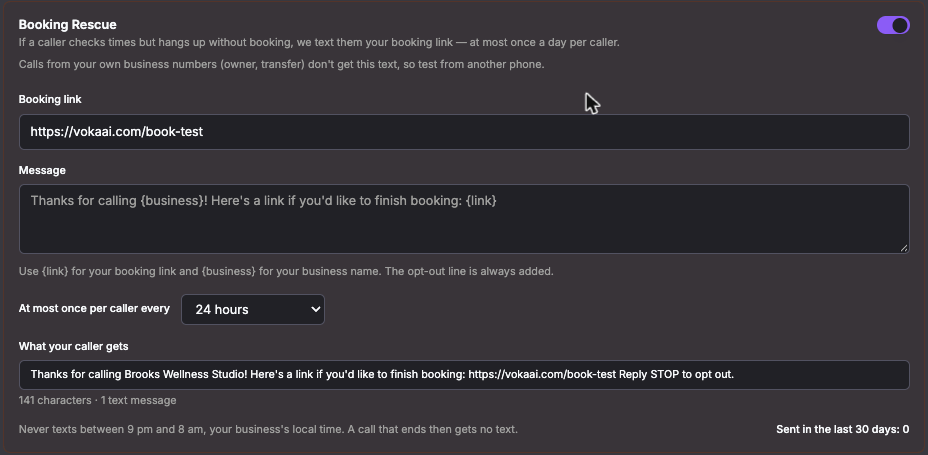
How to turn it on
Booking Rescue is off by default.
- Click AI Assistants and open your assistant.
- Open the SMS tab and make sure SMS is enabled for the assistant.
- Under Message Triggers, find the Booking Rescue card.
- In Booking link, enter your full booking page address, starting with
https://. - Optional: edit the Message. Use
{link}for your booking link and{business}for your business name. Click Reset to default to go back to the standard wording. The "Reply STOP to opt out." line is always added. - Choose At most once per caller every: 24 hours, 3 days, 7 days or 30 days.
- Check What your caller gets. It shows the exact text, with its length.
- Turn on the Booking Rescue switch at the top of the card. The card saves each change as you make it. The card shows Sent in the last 30 days so you can see how often it is used.
The switch stays off until you add a booking link. If you see "Add your business location's time zone", set your business location first (Set your business location link on the card). We need your time zone to know when it's daytime.
Good to know
- Quiet hours. Texts are never sent between 9 pm and 8 am in your business's local time. A call that ends during those hours gets no text.
- One text per caller per window. If someone calls three times today and you chose 24 hours, they get one text.
- Incoming calls only. Calls your assistant makes to others don't trigger it.
- Your own numbers are skipped. It never texts your business numbers, such as the owner's phone or a number you transfer calls to. To test it, call from a different phone.
- You need a booking link and SMS turned on.
- Who the text comes from.
- Free trials send from a shared Voka number. Callers can't reply to you through it, and replies don't reach your business.
- Paid accounts send from your own verified texting number. See SMS Setup & Verification.
- Opting out. Callers can reply STOP at any time and won't be texted again. See Compliance.
- Language. The default message is in English. If your assistant speaks French, the default is in French and English.
FAQ
Will a caller who already booked get this text? No. It is only for callers who checked times and left without booking.
I called from my own phone and got nothing. Is it broken? No. Your own business numbers are skipped on purpose. Test from another phone, and not between 9 pm and 8 am.
Is this the same as "Send the booking link" on the SMS tab? No. That is a separate option that sends the link after every call. Booking Rescue only sends it to callers who checked times and left. Turning Booking Rescue off puts your previous setting back.